TryHackMe - "Silver Platter"
Introduction
This challenge states that the target is protected against common known attacks and against password attacks (bruteforce, guessing, etc.)
It states that the team uses an intranet-level social network called “Silverpeas” to manage its projects, and the user “scr1ptkiddy” is mentioned.
Exploration
Well, the target machine displays a mostly static website, which is only informational (there are no server-side computations that can be attacked). The web server is not vulnerable.
So let’s move on to exploring the internal social network which is Silverpeas, which coincidentally runs on the same machine, listening on port 8080.
The social network in question is updated to 2022, as written in the footer, so let’s see if there are any known vulnerabilities regarding it. Yes, there is a vulnerability: CVE-2024-36042
Exploit
The vulnerability of Silverpeas, just mentioned, is simple: if the attacker, in the login form of the social network, sends only the username, and does not send the password (it is not enough to leave the password empty, but it must be removed from the header of the http request, at the name/value pair level), then the login is successful and we are connected with the account related to the username.
So let’s try to perform the very simple exploit by forging or altering our http browser request using the local proxy “Burpsuite”, so that the request no longer contains the password field, but only the username (scr1ptkiddy), and we are inside the social network, logged in as if we had entered the right password.
Once we are inside the “scr1ptkiddy” user account, we can explore the various sections a bit. For example, we notice that there are two other registered users (administrator, moderator). However, there is no other useful information in this account, so now that we know the username of the other two accounts, let’s try to exploit them and consequently explore their account (exactly as we did before with the first user), in order to discover more information.
In the moderator’s account there is a message written by the administrator in which the latter sends the ssh credentials (user and password) to him, as you can see in the following screenshot (we don’t report the password, but the screen is that one).
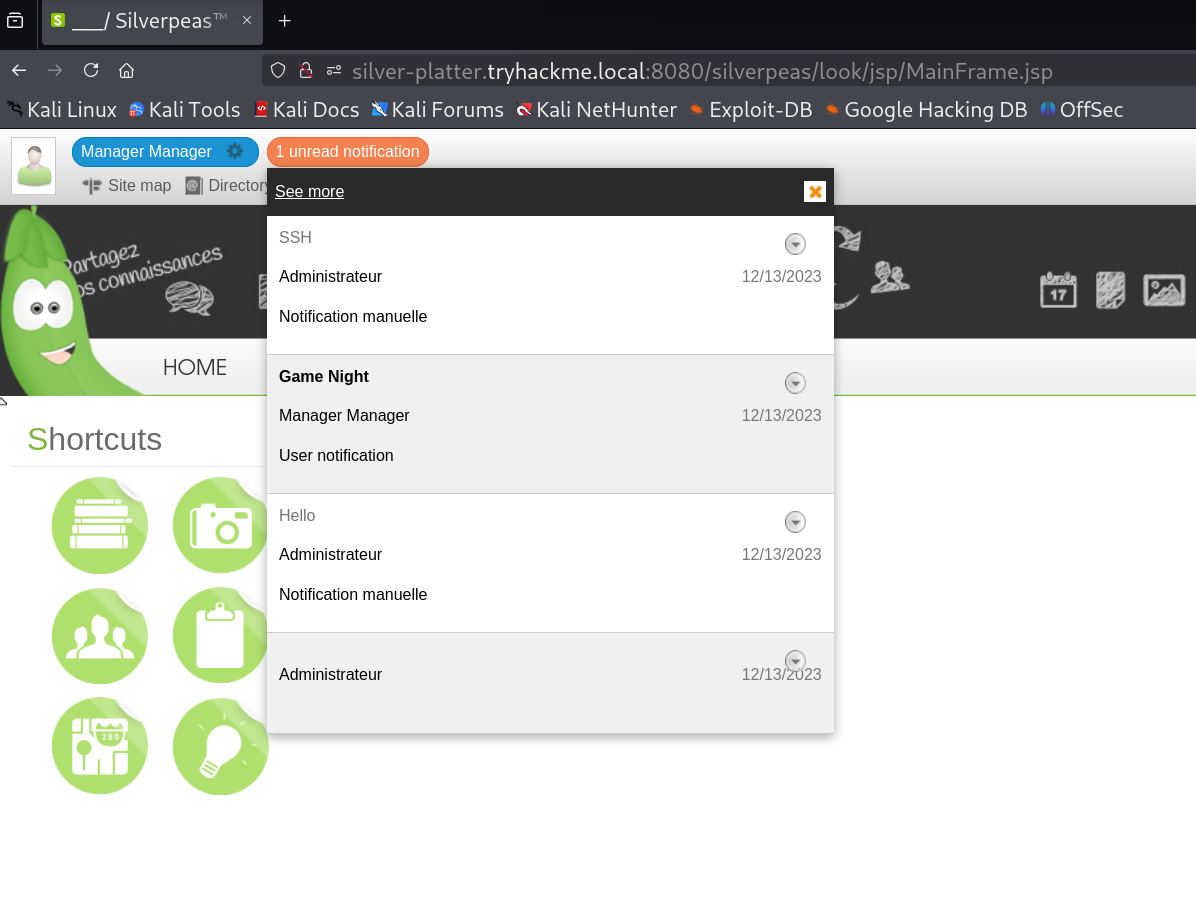
Now we can connect to the target machine’s ssh server, ready to escalate privileges
Privilege escalation
After connecting to the server via ssh, we can easily read the first flag of the normal user.
Now comes the most difficult part (but not so much). Let’s try to read the files /etc/passwd and /etc/group, to see what other users are there, and what groups they belong to, and we notice the existence of a user named “tyler” who belongs to the “sudo” group and therefore will probably be able to run several programs with root permissions (and strangely, he has the word “root” in the gecos field of “passwd”, and this let we think that “tyler” is a very important user).
Then we also notice that the current normal user of our ssh session (“tim”) belongs to “adm” group, which normally has permissions to read many log files (dmesg, auth, etc.)
We analyze the log files using the “grep” command (but there are also other ways, such as awk, perl, etc.). In particular, we analyze the authentication files (“auth” files), looking for lines that could have something to do with the “important” user, tyler
grep auth.log* -i -e "tyler" | grep -i -e "password"
We are lucky: in the returned output, there are some lines related to the use of “sudo” command (by tyler), which refer to the password of postgres database associated with the Silverpeas web application.
Obviously this password, should have nothing to do with tyler’s Linux password, but, do you want to see that probably it is a common password, used by tyler to log into the system too? Let’s verify this by logging in as user “tyler” (note: we do not report the password)
su tyler
Yes!! It’s the same password used for login, it works! By the way, using the command “sudo -l”, we find that “tyler” has full sudo privileges. So now, thanks to him, we can read the root flag in its private directory.